QR Code Ordering for Events, Bars and Festivals: No Hardware, No Contract
Can you use a QR ordering system for a single wedding, club party or festival weekend without buying devices or signing up for a year? Yes, if the system fits a few conditions. Here is what to check, and how a one-off event works with BiteTwo.
 BiteTwo TeamNovember 24, 20266 min read

A wedding in a rented hall, the summer party of the sports club, a weekend stand at the town festival: for a few hours you serve many people with a team that does not do this every day. Ordering by phone would help, but nobody wants to buy tablets or sign a twelve-month contract for one evening.
The short answer
Yes, you can use QR code ordering for a one-off event without buying hardware or signing a contract. You need a system that runs in the browser on devices you already own, that you can register for yourself, and that has no setup fee and no minimum term. BiteTwo is built this way: it is free, with no monthly fee, no setup fee, no commission per order and no lock-in, and setup takes about 10 minutes. Guests pay your staff in cash or by card as usual, because BiteTwo does not process payments.
What should an ordering system for a one-off event offer?
Most ordering systems are sold to restaurants that will use them for years. That shapes how they are sold: a demo, a quote, an onboarding and a contract. For a single event, check these points before anything else:
| Question | Why it matters for an event |
|---|---|
| Can I register myself today? | A demo and a quote can take longer than the time you have before the event. |
| Is there a minimum term or a setup fee? | A subscription per location with a minimum term makes no sense for one evening. |
| Does it need its own hardware? | Tablets, printers or terminals have to be bought, delivered and set up. |
| Do guests need an app or an account? | At an event nobody installs an app for one drink. |
| Does it work without tables? | A bar, a beer garden or a festival stand has no table numbers. |
| Can staff take orders too? | Not every guest wants to scan. The team needs one list for all orders. |
| How do guests pay? | In-app payment needs a provider account and time to set up. Paying the staff needs nothing. |
A system that passes these checks can be set up in the afternoon and forgotten the day after.
How does a one-off event work with BiteTwo?
- Register and create the event. You create a restaurant account yourself, without a sales call. Instead of tables you create groups: an event, the bar, a room, a takeaway counter. One group called "Wedding Müller" or "Bar" is enough to start.
- Add the menu. An event menu is short, so typing it in takes a few minutes. You can also let an AI assistant such as ChatGPT or Claude read a photo of your drinks list and import the result after checking a preview.
- Invite the team. Helpers get an invitation by email and sign in on their own phone. A tablet or laptop at the bar or in the kitchen shows the live list of orders.
- Add guests. A staff member adds a guest with one tap and shows a QR code and an 8-character code. The guest scans it and orders in the browser, without an app or an account. A name is optional.
- Serve. Orders reach the team in real time. Staff move each order from received to ready to served with one tap, and guests see the status on their phone.
- Settle up. Guests pay the staff as usual, in cash or with your own card reader.
Afterwards you simply stop using it. There is nothing to cancel and nothing to send back.
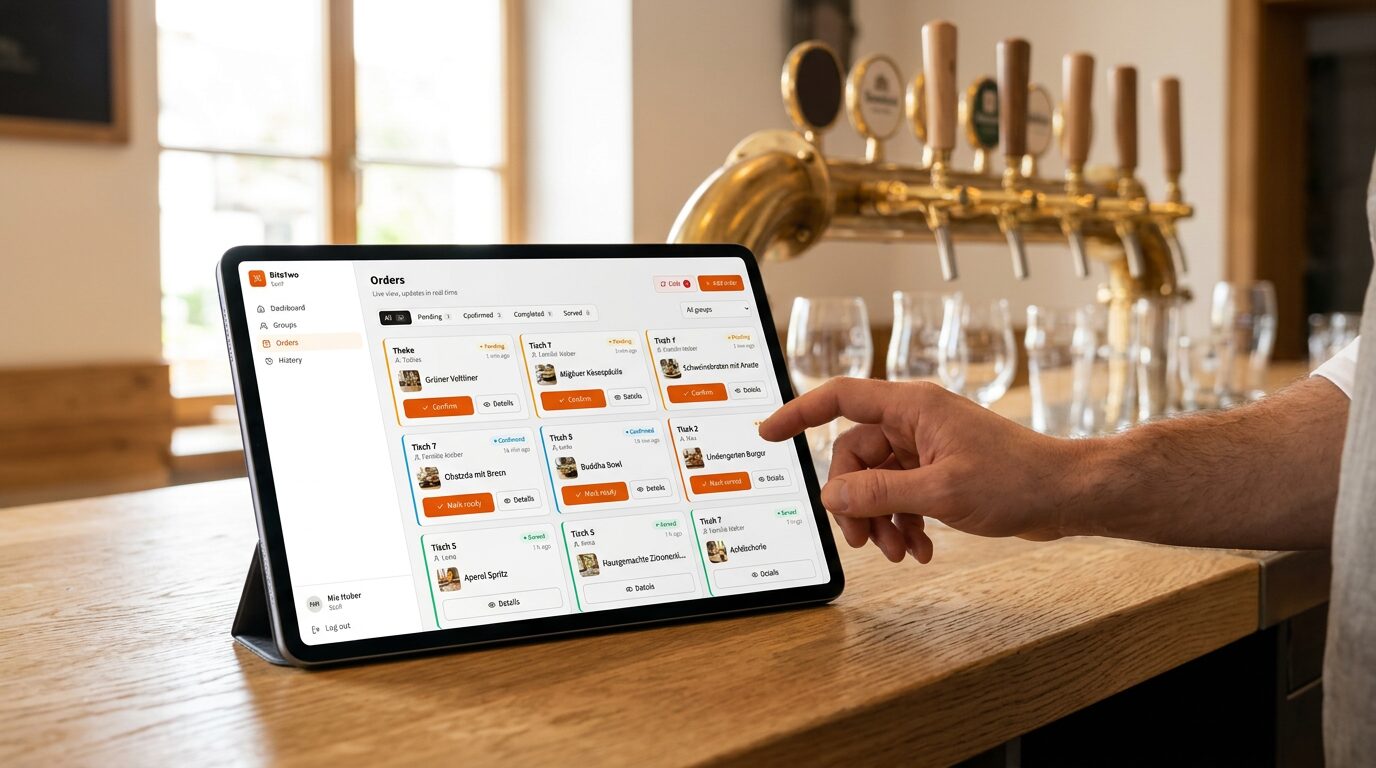 Any tablet, phone or laptop with a browser can show the live order list. Nothing has to be bought for it.
Does it work for a bar or a beer garden without table service?
Yes. A group does not have to be a table. The bar, the terrace or the whole beer garden can each be one group, and guests of that group order from wherever they sit or stand.
Two details help at a busy bar. Staff can save a filter on the order screen, so the bar tablet shows and rings only for drinks while the kitchen sees only food. And a guest who is already sitting with a drink can order the next round without queueing at the counter.
Staff can also enter every order themselves in the same system. If a guest prefers to order at the counter, the bartender types it in and it lands in the same live list.
What about a wedding or a private party where the host pays?
This works well, because every order is tied to a guest and a group. During the evening the team sees what was ordered, and afterwards you can export all orders of the day as a CSV file with gross, VAT and net amounts. That gives you a clean list for the invoice to the host.
Set the session length before the party. A guest code is valid for 4 hours by default, and you can choose anything from 1 to 12 hours, so the codes last from the reception to the last dance.
Where are the limits?
- BiteTwo is not a cash register. It does not issue fiscal receipts (TSE) and it does not process payments. You still need your usual way to take money.
- Orders appear on screens. There is no kitchen printer integration, so the bar and the kitchen each need a device with a browser.
- You need internet. BiteTwo is a web app. Check the mobile signal or the Wi-Fi at the venue, in particular in a cellar bar or on a festival field.
- Staff create every guest code. That keeps prank orders out, but at a festival with a large walk-up crowd it takes time. There it is faster to let staff enter the orders at the counter and use the kitchen and bar screens, and to offer phone ordering only in a seated area.
- The service day ends at 03:00. At 03:00 local time BiteTwo archives the day's visits and orders. Plan for that if your party runs through the night.
Frequently asked questions
Can I use QR code ordering for just one evening?
Yes. BiteTwo has no minimum term and no setup fee, so you can use it for a single evening and stop afterwards.
What does QR code ordering cost for an event?
With BiteTwo all features are free today: no monthly fee, no setup fee, no commission per order and no lock-in. Many other systems charge a monthly subscription per location, so check the minimum term before you sign up for one event.
Do guests need an app?
No. Guests scan a QR code or type an 8-character code, and the menu opens in their phone's browser. They do not need an account, an email address or a name.
What hardware do I need for the event?
None to buy. Staff use any phone, tablet or computer with a browser, and guests use their own phones. A tablet at the bar and one in the kitchen are useful, and they can be borrowed.
Can guests pay in the app at my event?
No. With BiteTwo guests pay the staff in cash or with your own card reader, and BiteTwo takes no cut.
How long before the event do I have to start?
Setup takes about 10 minutes: create the account, add the menu, invite the team. Doing it a few days earlier and placing a few test orders with your helpers is still a good idea.
Conclusion
QR code ordering is not reserved for restaurants with a long contract. For a one-off event, pick a system that runs in the browser, that you can register for yourself and that costs nothing to start or to stop. Then the only preparation left is a short menu, a charged tablet at the bar and a team that has tried it once.
Start for free and set up your event, or book a demo if you would like to see it first.